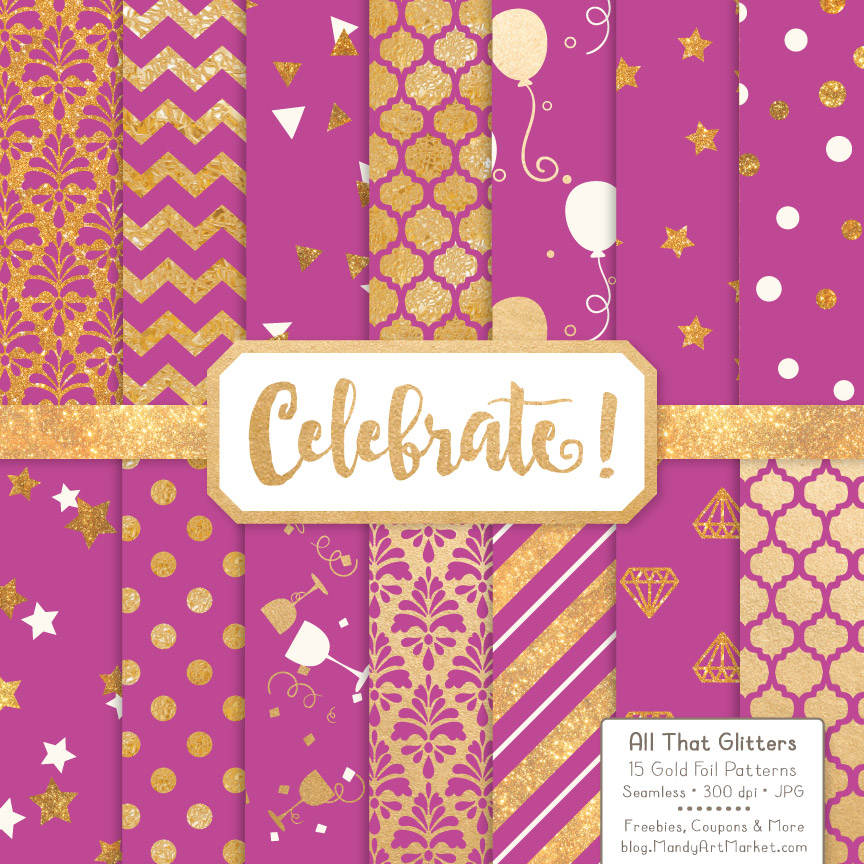
Christmas Celebrate Gold Digital Paper Set
Designing for the holiday season—and beyond—requires assets that balance elegance with versatility. The Christmas Celebrate Gold Digital Paper Set delivers exactly that: 15 high-resolution, seamless digital papers built for real-world creative workflows. Each pattern is crafted at 300 dpi and sized 12 x 12 inches, making them suitable for both digital display and professional printing without pixelation or scaling distortion. This isn’t just a decorative collection—it’s a production-ready resource designed to integrate smoothly into planning, execution, and delivery phases across multiple disciplines.
Where This Set Fits in Your Creative Process
Digital paper sets like the Christmas Celebrate Gold Digital Paper Set function as foundational layers—not final outputs. They sit between concept and execution: after you’ve defined your audience and objective, but before you finalize layout, typography, or copy. For example, a small business owner preparing holiday-themed email campaigns might select the Gold Confetti Digital Paper as a background for a limited-time offer banner. A wedding planner designing custom thank-you cards could layer the Diamonds Digital Paper beneath elegant script fonts to reinforce luxury without visual clutter. In each case, the pattern serves as a consistent visual anchor that supports messaging rather than competing with it.
Because all 15 patterns are seamless, they tile infinitely—critical when scaling designs across large-format prints (like event backdrops) or responsive web elements. That eliminates manual tiling, edge-matching, or repeat artifacts that often derail time-sensitive projects. You’re not just saving minutes; you’re preserving fidelity across formats and devices.
Practical Use Cases Across Roles and Timelines
The value of the Christmas Celebrate Gold Digital Paper Set extends far beyond December. Its patterns map cleanly to multiple occasions and professional needs:
- Before a project: Use the Star Digital Paper or Wine Glass Digital Paper during mood board development to establish tone for New Year’s Eve invitations or corporate year-end celebrations.
- During execution: Embed the Balloon Digital Paper directly into Canva templates for social media announcements—no need to adjust opacity or add overlays to soften intensity.
- After launch: Repurpose the Gold Damask Digital Paper into printable gift tags or packaging inserts for post-holiday product bundles—maintaining brand cohesion without redesigning from scratch.
Educators building seasonal lesson plans can use the Star or Diamonds patterns as subtle backgrounds for handouts, reducing visual fatigue while reinforcing thematic focus. Freelance designers working with clients on branded merchandise often send mockups using these papers early in the review cycle—clients respond more confidently to polished visuals, even in draft form.
Compatibility and Integration Into Existing Tools
All 15 files arrive as JPGs—a universally supported format that opens instantly in Adobe Photoshop, Illustrator, Affinity Designer, Canva, PicMonkey, and even Microsoft PowerPoint. No conversion steps. No plugin dependencies. If your workflow relies on cloud-based collaboration, upload the entire set to Google Drive or Dropbox and share a single link with team members or clients. Designers using Figma can drag-and-drop any JPG as a fill layer; marketers building Mailchimp campaigns can insert them as background images in section modules.
For print production, the 300 dpi resolution meets industry standards for business cards, brochures, and wall art up to 24 x 36 inches. Just confirm your printer accepts JPGs at full size—most do—and embed color profiles (sRGB for digital, CMYK if your vendor specifies it). No additional retouching is needed; gold tones are calibrated for consistency across screens and press runs.
Organization and Long-Term Usability
File naming matters. The Christmas Celebrate Gold Digital Paper Set uses clear, descriptive labels—GoldConfetti_12x12.jpg, WineGlass_12x12.jpg, etc.—so you can sort by occasion, texture, or complexity in your asset library. Store them in a dedicated “Holiday & Event Textures” folder nested under your master “Design Resources” directory. Add metadata (keywords like “gold,” “seamless,” “holiday,” “print-ready”) in your DAM or file explorer for faster retrieval later.
Over time, track which patterns get reused most. You’ll likely find the Gold Damask and Star papers appearing across Q4 marketing, January goal-setting kits, and spring gala materials. That signals strong cross-seasonal utility—not just holiday relevance. When evaluating future digital paper purchases, prioritize sets with similar naming logic, resolution consistency, and seamless behavior to maintain workflow predictability.
Quality Control and Real-World Output Tips
Before deploying any pattern, test it at actual output size. Zoom to 100% in your design app and check for subtle banding, misaligned repeats, or inconsistent glitter density—especially in the Gold Confetti and Diamonds files. These details impact perceived polish. If you’re printing on textured paper (like linen or metallic stock), run a small proof first: some glitter effects render differently depending on surface absorbency.
For digital use, verify contrast ratios if text will overlay the pattern. The Balloon and Wine Glass papers have higher visual contrast than the subtler Gold Damask, so pair lighter typefaces with the latter and bolder weights with the former. Never assume automatic accessibility compliance—test with tools like Stark or axe DevTools when building web-based materials.
Efficiency Gains You’ll Notice Immediately
Switching from sourcing free patterns (with inconsistent sizing, watermarks, or licensing limits) to using a unified, pre-vetted set like the Christmas Celebrate Gold Digital Paper Set cuts average design setup time by 20–30%. One freelance graphic designer reported reducing her holiday card template creation from 90 minutes to under 40—just by eliminating trial-and-error alignment and resolution fixes. Another small business owner automated her Etsy listing backgrounds using batch actions in Photoshop, applying the same Star pattern across 12 SKUs in under five minutes.
That efficiency compounds. Once you’ve established a rhythm—selecting, testing, applying, and archiving—you build muscle memory. Next time you’re drafting a client proposal for a holiday pop-up shop, you’ll instinctively reach for the Gold Confetti paper instead of starting from white canvas. That’s not just speed—it’s decision fatigue reduction.
Making It Part of Your Routine
Treat this set like a physical tool: keep it accessible, label it clearly, and rotate usage intentionally. Add one pattern per month to your “Featured Resource” Slack channel or internal newsletter—even outside the holidays—to remind your team of its range. Bookmark the folder in your OS sidebar. If you use Notion or Airtable for creative asset tracking, log each pattern with notes on where it performed best (e.g., “Diamonds: highest CTR on Instagram Story ads, Q4 2023”).
The Christmas Celebrate Gold Digital Paper Set doesn’t replace strategy or skill. It removes friction between intention and outcome—letting you focus on what matters: clear communication, thoughtful execution, and work that reflects your standards, not your constraints.